Reverse Engineering iOS to Fix SDK Crashes
Type casting in Swift gives us confidence that when a cast succeeds, we can safely access the methods and properties of the target type. But what if the cast does succeed but the object isn’t actually the expected type?
This is exactly what happened when iPadOS 26 introduced a subtle change in how certain view controllers handle type casting — a change that required us to dive deep into Objective-C’s dynamic runtime and reverse-engineer Apple’s private frameworks to understand what was really happening.
TL;DR: iPadOS 26 introduced a change where UIPrintPanelViewController overrides isKindOfClass: to return true for UISplitViewController casts, even though it’s not a subclass. This caused our SDK to crash when accessing methods that don’t exist. We released a fix in the Sentry Cocoa SDK v8.57.3
The Beginning
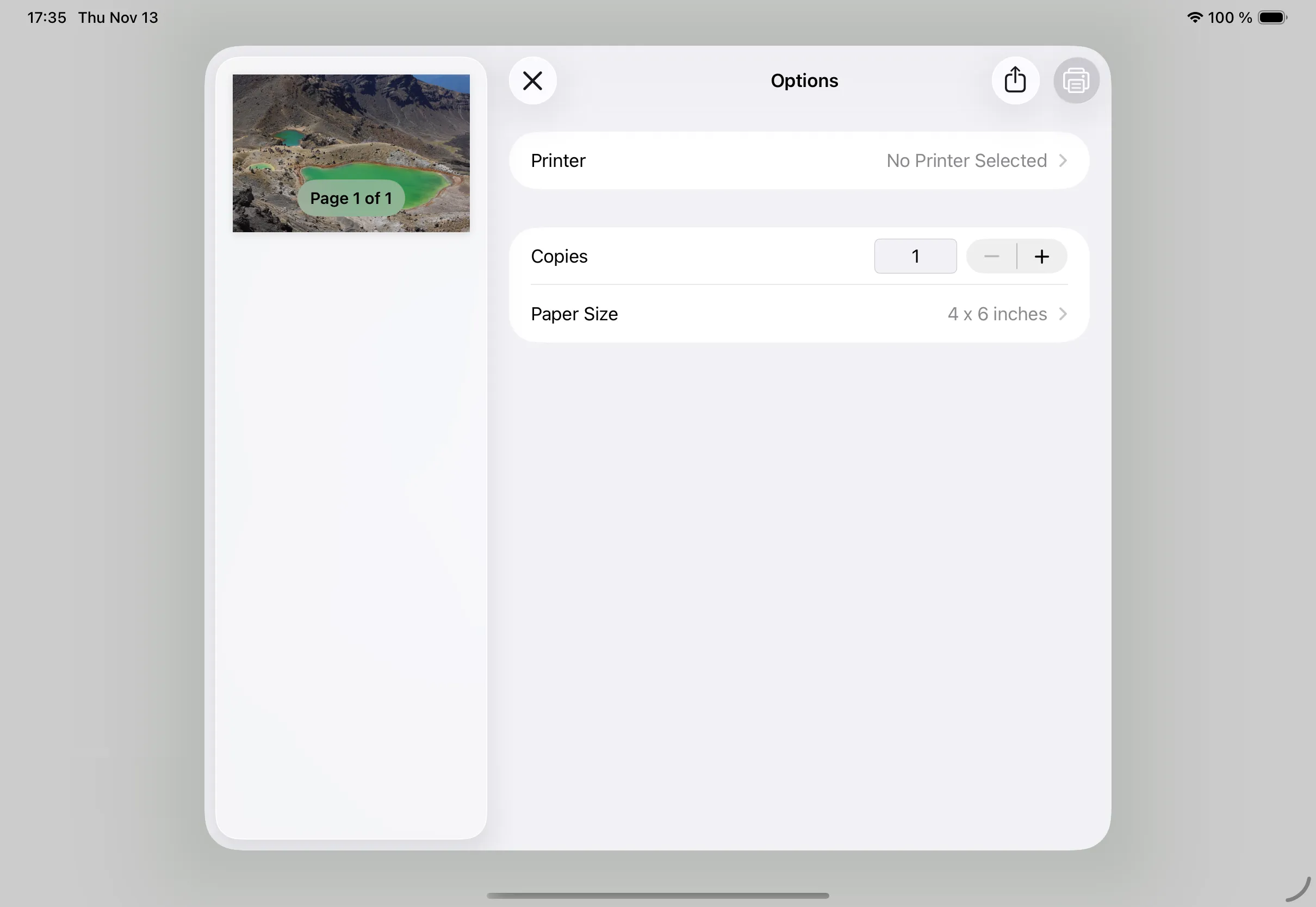
On Nov 9th, 2025, a user opened a new issue in the Sentry Cocoa SDK repository, informing us that the Sentry SDK started to cause app crashes on iPadOS 26 when using the standard iOS UIPrintInteractionController while Sentry’s User Interaction Tracing is enabled:
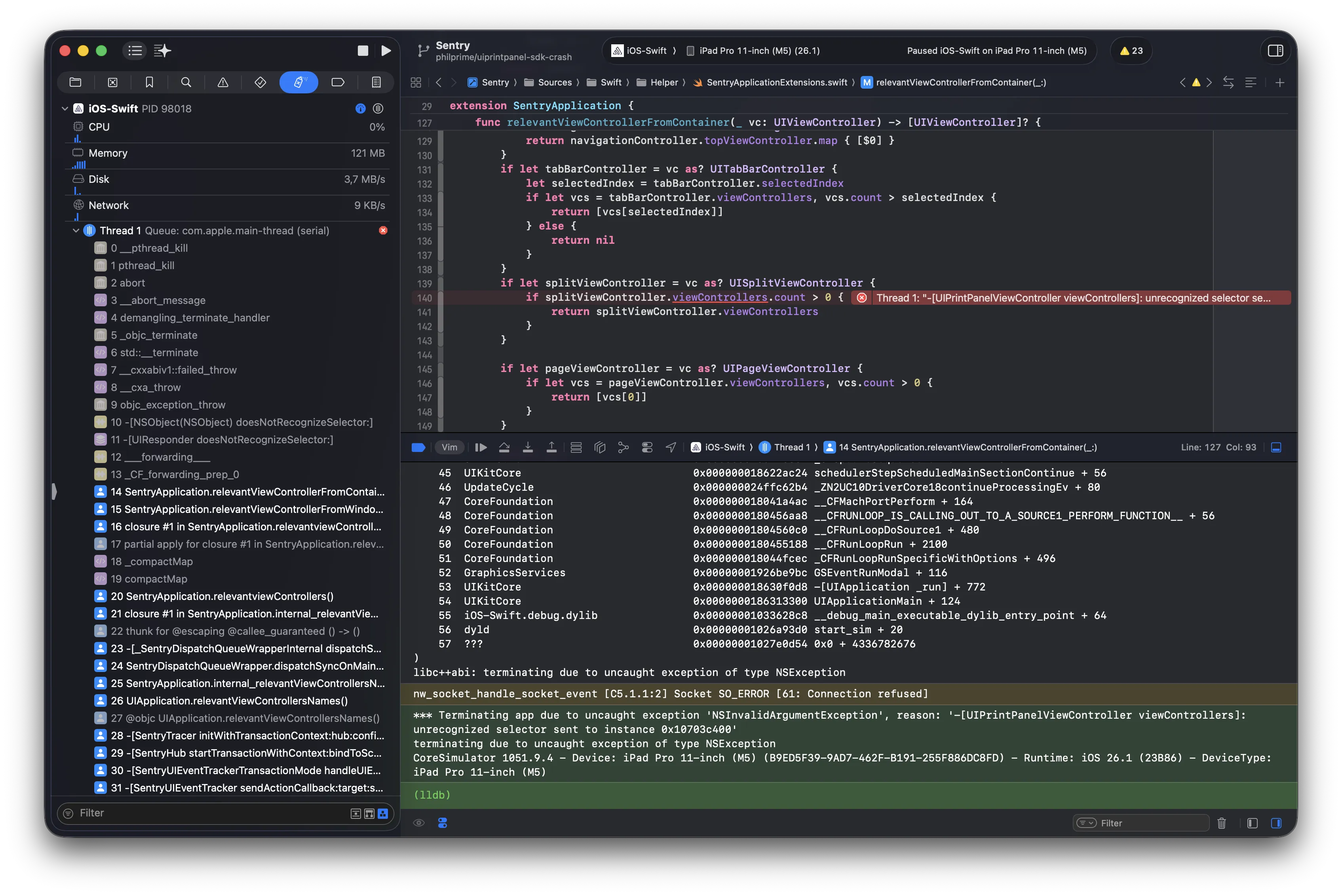
NSInvalidArgumentException: -[UIPrintPanelViewController viewControllers]: unrecognized selector sent to instance 0x124f45e00
  ...
  Sentry              0x104256ad0  SentryApplication.relevantViewControllerFromContainer (SentryApplicationExtensions.swift:140)
  ...
  Sentry              0x104241074  -[SentryUIEventTracker sendActionCallback:target:sender:event:] (SentryUIEventTracker.m:86)
  Sentry              0x1042357f4  +[SentrySwizzleWrapper sendActionCalled:target:sender:event:] (SentrySwizzleWrapper.m:57)
  Sentry              0x104235670  __49-[SentrySwizzleWrapper swizzleSendAction:forKey:]_block_invoke_2 (SentrySwizzleWrapper.m:36)
  UIKitCore           0x1a3ad066c  -[UIControl sendAction:to:forEvent:]
  ...
  UIKitCore           0x1a422ad24  -[UIApplication sendEvent:]
  MyApp               0x1026d21bc  MyApplication.sendEvent (MyApplication.swift:17)
  ...
Seeing the error message unrecognized selector sent to instance is always a bad sign, because it means we are trying to access a property or call a method that does not exist on an instance — something that should’ve been caught at compile-time already.
Luckily the customer provided us with sample code and I could quickly reproduce the issue, pointing to the following lines of code in our SDK:
if let splitViewController = vc as? UISplitViewController {
  if splitViewController.viewControllers.count > 0 {
    return splitViewController.viewControllers
  }
}
The Search
Having a reproducer is always great because we can dig deeper into the crash at runtime using debugging tools and investigate what’s really going on. Looking at the code in our SDK, we can tell that we conditionally cast an UIViewController to its subclass UISplitViewController, and only if it succeeds we can access its property viewControllers:
if let splitViewController = vc as? UISplitViewController {
    if splitViewController.viewControllers.count > 0 { // <--- CRASH 💥
        return splitViewController.viewControllers
    }
}
But this already raised the first concerning question:
How can a cast succeed but not be the expected type?
So I started looking at the type of the crashing view controller:
(lldb) po type(of: vc)
UIPrintPanelViewController
Ah, it’s an UIPrintPanelViewController, an undocumented private class of the private framework UIPrintUI, which we know nothing about — awesome /s.
So, it seems that our generic cast to any subclass of UISplitViewController succeeds, as otherwise it would return nil and not enter the if-block at all. Let’s double-check that:
(lldb) po splitViewController as? UISplitViewController
▿ Optional<UISplitViewController>
  - some : <UIPrintPanelViewController: 0x10380d200>
The cast succeeds, so the class of splitViewController must certainly be a subclass of UISplitViewController, right?
(lldb) po type(of: splitViewController).isSubclass(of: UISplitViewController.self)
false
To conclude: The cast succeeds for an UISplitViewController, but it’s not an UISplitViewController… what?
Interestingly there is not much information about this online, but a quick web search showed that the exact same crash is also happening in the Google Mobile Ads SDK with an ongoing discussion in their support forum.
But How?
At this point, I started asking my fellow maintainers for additional input, so my colleague Itay started looking into it too.
He started to look up class headers extracted from the iOS-internal dynamic libraries and found a first indicator that at least on iOS 17 the UIPrintPanelViewController wasn’t a subclass of UISplitViewController but instead of a UIViewController (reference):
@interface UIPrintPanelViewController : UIViewController <
    UIPopoverPresentationControllerDelegate,
    UIPrintPanelAppearanceDelegate,
    UINavigationControllerDelegate
> { ... }
But with iOS 26, Apple started to change a lot of internal UI hierarchy due to the introduction of Liquid Glass, e.g. the view hierarchy of the standard component UISlider changed massively too:
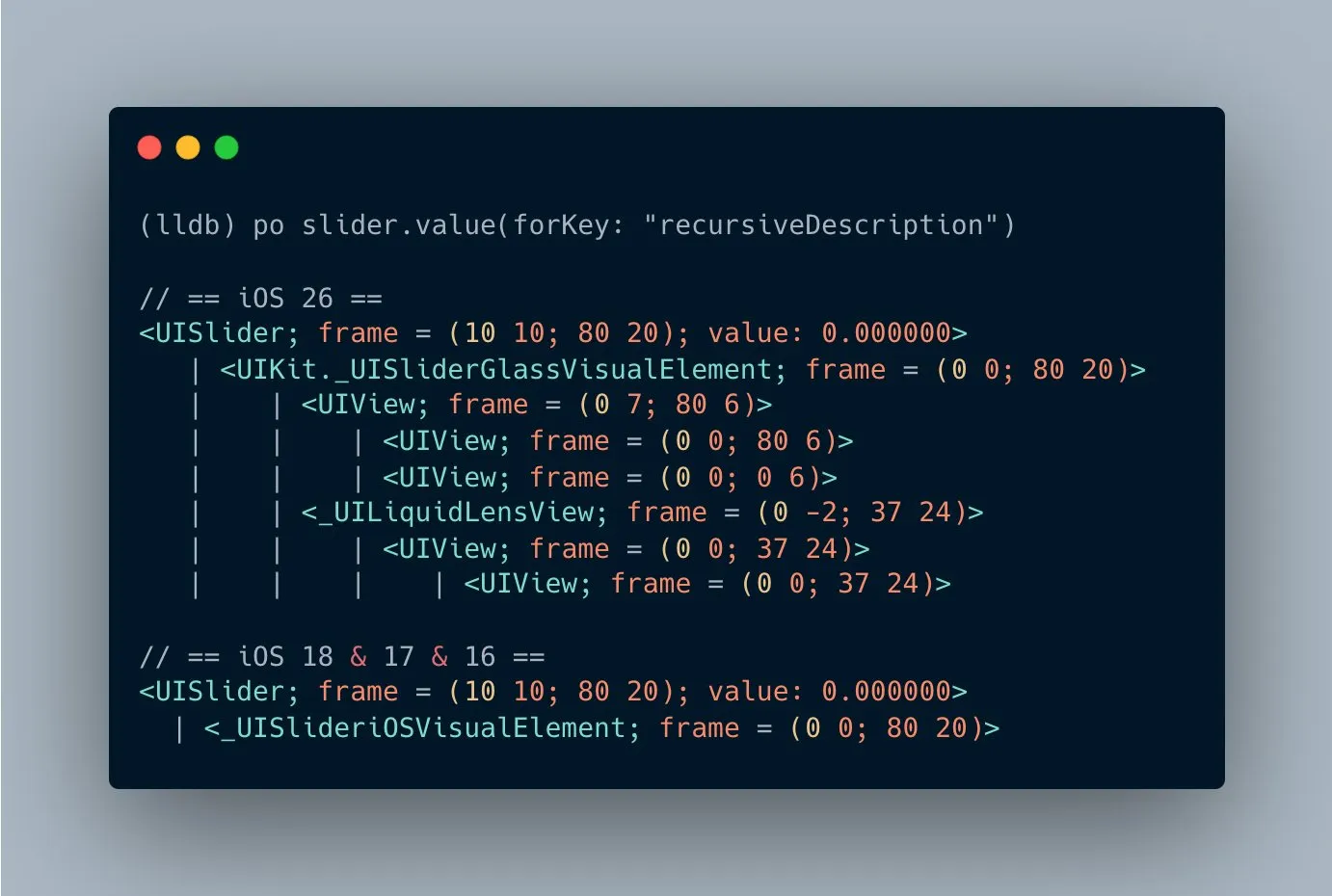
So Itay set up a Runtime Header Analyzer / Browser to extract the actually header of UIPrintPanelViewController on iOS 26. The output was similar, indicating it’s still not a subclass of UISplitViewController, but at least a delegate of it, an UISplitViewControllerDelegate:
/*
    Generated by RuntimeBrowser
    Image: /System/Library/PrivateFrameworks/PrintKitUI.framework/PrintKitUI
 */

@interface UIPrintPanelViewController : UIViewController <
    UINavigationControllerDelegate,
    UIPopoverPresentationControllerDelegate,
    UIPrintPanelAppearanceDelegate,
    UISplitViewControllerDelegate
> { ... }
We started to question the core principles of working with Swift & Objective-C and our own sanity. Are we missing an edge case of the standard optional-cast operator as??
Trying to understand the class hierarchy, I did more debugging, including a recursive superclass resolver to get the full superclass chain:
func describe(object: AnyObject) {
    print("Swift type(of:):", type(of: object))

    if let cls = object_getClass(object) {
        print("object_getClass:", NSStringFromClass(cls))

        print("Superclass chain:")
        var c: AnyClass? = cls
        while let cc = c {
            print(" ->", NSStringFromClass(cc))
            c = class_getSuperclass(cc)
        }
    } else {
        print("object_getClass returned nil")
    }

    print("obj is UISplitViewController? ->", object is UISplitViewController)
    print("as? UISplitViewController ->", (object as? UISplitViewController) != nil)
}
// Output:
Swift type(of:): UIPrintPanelViewController
object_getClass: UIPrintPanelViewController
Superclass chain:
-> UIPrintPanelViewController
-> UIViewController
-> UIResponder
-> NSObject
obj is UISplitViewController? -> true
as? UISplitViewController -> trueThe output still didn’t make much more sense, because it just showed once again that the UIPrintPanelViewController is actually a subclass of UIViewController, but the casting to UISplitViewController still succeeds.
Diving further into understanding the Swift casting operator as? and having some discussions with our lovely LLM-companions, I remembered how we do casting in Objective-C, which is still used by most of the standard UI types in iOS:
NSObject *instance = ...; // Type-erased object
if ([instance isKindOfClass:UITextField.self]) {
    UITextField *textField = instance;
    // Now use `textField` because it has type information at compile-time
}
So what if the Swift operator as? is actually relying on the isKindOfClass: method?
Objective-C’s Dynamic Runtime
To understand what’s happening and why our Cocoa SDK can perform a lot of auto-instrumentation using Swizzling, we need to have a high-level understanding of how Objective-C works.
When an app runs, Objective-C doesn’t call methods by jumping directly to fixed memory addresses. Instead, every time compiled code calls a method, the runtime looks up which function to execute by using the method’s selector (its name) on the class. Think of it as a dynamic “method lookup” system.
Swizzling takes advantage of this. We replace the runtime’s pointer for a specific method so that the selector now points to our own wrapper function instead of the original one. The original method implementation still exists — we just intercept the call so we can run our code first and then forward the call back to the real implementation. It’s similar to monkey-patching in JavaScript or Python.
Because this changes behavior for the entire app and not just for our SDK, it must be done carefully. If two libraries swizzle the same method incorrectly or in the wrong order, it can lead to unexpected behavior. This is why swizzling is powerful but also considered risky if you’re not careful.
So, how is this relevant to our case? Well, it helps us to figure out if the isKindOfClass: is really overridden in the UIPrintPanelViewController by looking at the implementation address in the lookup system in combination with the superclass hierarchy.
As all types in Objective-C must be subclasses of NSObject, we expect them to rely on its implementation of isKindOfClass: and we can find the address pointer in the lookup system using class_getMethodImplementation:
(lldb) po class_getMethodImplementation(
  NSClassFromString("NSObject"),
  NSSelectorFromString("isKindOfClass:")
)!
▿ 0x0000000180097bc8
  - _rawValue : (Opaque Value)
We know from our superclass chain that the UIPrintPanelViewController is a subclass of UIViewController, which is used by every view controller, as it’s a foundational type in UIKit, so we can skip the UIResponder and directly check its method implementation and see if it points to the implementation of NSObject:
(lldb) po class_getMethodImplementation(
    NSClassFromString("UIViewController"),
    NSSelectorFromString("isKindOfClass:")
)!
▿ 0x0000000180097bc8
  - _rawValue : (Opaque Value)
Great, it’s the same address 0x0000000180097bc8, indicating it’s not overridden and proving our assumption.
Now we get to the one-million-dollar-question, what’s the address for UIPrintPanelViewController?
(lldb) po class_getMethodImplementation(
    NSClassFromString("UIPrintPanelViewController"),
    NSSelectorFromString("isKindOfClass:")
)!
▿ 0x000000024132b1b8
  - _rawValue : (Opaque Value)
It points to another address 0x000000024132b1b8, indicating that isKindOfClass: has been overridden in this class, likely to support some internal behavior related to split view handling in the printing UI.
Reverse-Engineering to Prove a Point
At this point we already had strong indicators that the UIPrintPanelViewController implementation of isKindOfClass: returns true when comparing to a UISplitViewController, even though it isn’t a subclass of it at all.
But we wanted to be (more) sure, so Itay started to decompile the method in the private framework using Hopper and found a suspicious usingSplitView with some register operations in the implementation:
/* @class UIPrintPanelViewController */
-(int)isKindOfClass:(int)arg2 {
    // Regular registers stuff

    // Probably the super.isKindOfClass
    r0 = loc_25fdf2cf0(&var_30, 0x1fab10310, arg2);

    r20 = r0;

    // Checks for some special class, possibly UISplitViewController
    if (loc_25fdf2d00(*0x2782877d0) == arg2) {
            r20 = [r19 usingSplitView];
    }
    r0 = r20;
    return r0;
}
Another strong indicator that the implementation of this method is somehow performing special handling for UISplitViewController, resulting in the invalid cast and crashing SDKs.
This was reason enough to stop the investigation and conclude that this special handling creates an incompatibility with our SDK’s assumptions about type casting behavior.
The Fix
Now that we know what the issue is and that it’s pretty much outside of our control what Apple does internally, we resort to the common approach of using respondsToSelector: to add a runtime check if the instance actually has a method named viewControllers:
if let splitViewController = vc as? UISplitViewController {
    // Check if the selector exists as a double-check mechanism
    // See: https://github.com/getsentry/sentry-cocoa/issues/6725
    if !splitViewController.responds(to: NSSelectorFromString("viewControllers")) {
        SentrySDKLog.warning("Failed to get viewControllers from UISplitViewController. This is a known incompatibility in iOS 26.1")
    } else if splitViewController.viewControllers.count > 0 {
        return splitViewController.viewControllers
    }
}
To quote our Director of Engineering Daniel:
We write the dirty code, so our customers don’t have to!
…and this might not be the prettiest code, but at least the SDK is not crashing anymore and we were able to quickly release a hotfix to handle this edge case
Thanks for reading!